I totally enjoy the new location testing features of xcode 4.2. Ability to test with any fake location is really a blessing! Today I saw that the app is not working right in one of the locations (it works poorly in few of them, but I’m fixing intensively :)). That was South Brisbane, and my first chance to add a custom location.
After thinking for a while what would be the minimum data for a file required I actually found out that Xcode is capable of adding a minimalistic template for a start!:
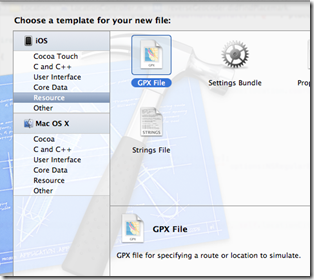
That is what a file looks like:
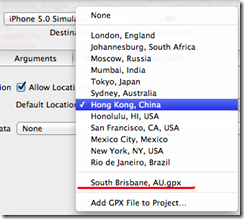
Name the file nicely as its name is used when you pick it up:
To see how to add speed, accuracy, etc to your testing/simulation you may continue with: Use Automation to bring speed, accuracy, altutude, etc to your location app testing
Links:
GPX specification: http://www.topografix.com/gpx.asp
Google Maps 2 GPX: http://www.elsewhere.org/journal/gmaptogpx/
After thinking for a while what would be the minimum data for a file required I actually found out that Xcode is capable of adding a minimalistic template for a start!:

That is what a file looks like:
<?xml version="1.0"?>
<gpx version="1.1" creator="Xcode">
<wpt lat="49.930008" lon="15.369873">
<name>South Brisbane, AU</name>
</wpt>
</gpx>
Name the file nicely as its name is used when you pick it up:

To see how to add speed, accuracy, etc to your testing/simulation you may continue with: Use Automation to bring speed, accuracy, altutude, etc to your location app testing
Links:
GPX specification: http://www.topografix.com/gpx.asp
Google Maps 2 GPX: http://www.elsewhere.org/journal/gmaptogpx/


 Posts
Posts


2 comments:
I encountered strange Xcode crashes every time I tried to load a GPX file. Turns out it's a localization problem: http://openradar.appspot.com/radar?id=1392405
The localization bug mentioned by previous comment is in number formatting. If you system is set up to a country with decimal number separator different from the dot you should use this separator in the GPX file wet values.
i.e. 44,5 rather than 44.5
Post a Comment